Most SEO agencies run the same playbook on Magento they use on every other platform. They research keywords. They optimize title tags. They build links. And six months later they cannot explain why a 10,000-product catalog has 280,000 indexed URLs, why organic revenue has not moved, or why the catalog restructure last spring quietly destroyed two years of ranking progress.
Magento is a different kind of platform. It gives you more architectural control than Shopify or WooCommerce — and leaves more consequential decisions unmade by default. Canonical tags. Layered navigation URL behavior. Redirect chain management. These are the decisions that determine whether Google’s crawler reaches your revenue pages or gets consumed by filter permutations it will never rank.
We fix the architecture first. Then we build category authority, product visibility, and organic revenue on top.

Shopify makes SEO decisions for you. Canonical tags are on by default. Filtered URLs are noindexed automatically. URL structure is consistent across every store. There is less to configure and less to break. That is by design — Shopify trades flexibility for predictability.
Magento is built for the opposite use case. A single Magento instance can run multiple websites, stores, and store views with different domains, catalogs, languages, currencies, and customer groups. The same product can legitimately live at different URLs in different contexts. Canonical tag defaults that work on Shopify would create configuration conflicts in a multi-store Magento setup. So Adobe ships them turned off, and every store either configures them correctly — or does not.
The consequences scale with the catalog. A canonical misconfiguration that creates 200 duplicate pages on a 500-product Shopify store creates 200,000 indexable URLs on a 10,000-product Magento catalog with layered navigation enabled. The same scaling effect applies to redirect chain debt, structured data errors, and Core Web Vitals — Magento amplifies everything in both directions.
This is why general SEO agencies struggle on Magento accounts. The work requires someone who has been inside the platform — who knows exactly where in the admin panel the canonical tag settings live, how the url_rewrite database table grows across every catalog restructure, how layered navigation generates indexable URLs at scale, and why a Luma store scoring 26 on mobile PageSpeed cannot close that gap with caching alone. It requires platform knowledge, not just SEO knowledge.
Adobe Commerce (formerly Magento Commerce) and Magento Open Source run on the same codebase. When we refer to Magento throughout this page, we mean both — and everything here applies equally to either. Where differences exist between editions, we call them out explicitly.
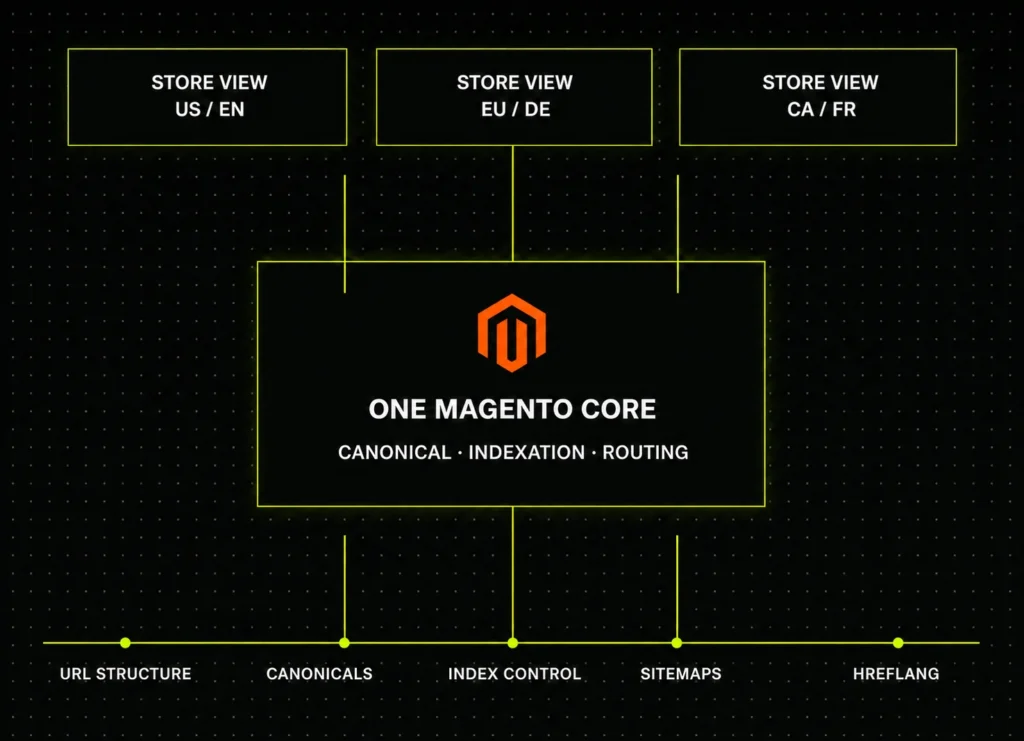
These are not edge cases. They are the default state of most Magento stores in production — including stores that have had previous SEO agencies working on them. They exist because Magento’s architecture is built for flexibility, not SEO simplicity. And because they compound silently, they are usually worse than the store owner realizes before the audit.
In Magento’s admin panel, under Stores → Configuration → Catalog → Search Engine Optimization, two settings control canonical tags for categories and products. The label for each reads: “Use Canonical Link Meta Tag.” Both default to No. Most stores run in production for months or years without anyone changing them.
The consequence is immediate and measurable. Every product in your catalog is reachable through multiple valid URL paths — the direct product URL, the category-prefixed URL, and one additional path for every other category the product belongs to. Google indexes every version as a separate page. Your ranking authority fragments across every URL variant. The search engine has to arbitrate between them without guidance. It makes a choice — but not necessarily the one that concentrates authority on the URL you would have chosen.
If your catalog has 4,000 products with an average of two category assignments per product, that is 8,000 competing URL pairs before you factor in pagination or layered navigation. Google is not ranking your products from 4,000 pages. It is trying to rank them from 16,000.
What we do: We audit your full catalog’s URL variants, enable canonical tag configuration correctly for your store’s specific URL structure — not globally, which can break multi-store setups — and verify every canonical is set in the rendered HTML output, not just in the admin settings panel. Then we monitor for configuration drift, because extension updates and admin changes can silently reset canonical behavior.
Magento’s layered navigation lets shoppers filter category pages by product attributes — color, size, price range, brand, material, rating, and any custom attributes you have configured. Each filter combination creates a unique URL. Each one of those URLs is indexable by default. No canonical back to the base category. No robots.txt disallow. No noindex tag. Just a new page, created automatically, entered into Google’s index.
With eight filterable attributes across a category of 3,000 products, the number of possible filter URL combinations reaches into the hundreds of thousands. Multiply that across your full category tree and you understand why Magento stores commonly have indexed URL counts that are ten to fifty times larger than their actual product and category count.
The specific damage this causes: Google’s crawl budget — the finite number of pages it will crawl from your domain per day — gets consumed entirely by filter permutations that have no search demand. Your actual category pages, product pages, and content pages receive less frequent crawl attention as a result. Catalog updates take weeks or months to appear in search results. New products sit unindexed longer than they should. Category pages that should rank for high-volume buying queries are not getting crawled with enough frequency for Google to apply recent ranking signals.
The solution is not to block all filter URLs. Some combinations have genuine search demand — “waterproof hiking boots size 10 wide” is a query real buyers search. “Boots sorted by position ascending, 48 per page, filtered by availability” is not.
What we do: We build an attribute-level indexation matrix for your catalog: indexable for filter combinations with measurable search demand, coordinated noindex and robots.txt control for everything else — verified on rendered HTML output, not assumed from extension settings.
Every time you rename a product, change a category URL, restructure your catalog hierarchy, update a URL key, or install a new SEO extension, Magento adds entries to its url_rewrite database table. The platform tracks every historical URL path to preserve redirect continuity. It does not automatically collapse chains — so when URL A was renamed to B, then B was restructured to C, then C was reorganized to D over three catalog cycles, Google now follows four redirect hops to reach one page.
After three to five years of normal catalog management, chains averaging three to six hops are routine. Worst-case chains of eight or nine hops are not rare after multiple restructures and extension changes. Every hop in a redirect chain costs PageRank. The authority that should flow directly to your category and product pages bleeds out at each step. Some chains loop back to previous URLs, creating crawl traps. Some terminate at 404 pages from URLs that were redirected and then deleted.
The result is that pages generating organic revenue may be receiving a fraction of the PageRank they have earned, because a three-year accumulation of catalog management decisions is standing between that authority and the page that should hold it.
What we do: We pull your complete url_rewrite table and audit it systematically — chain identification, loop detection, orphan redirect mapping, and depth analysis. Every chain is collapsed to a single hop. We document the cleanup and establish a governance process so chains do not regenerate during your next catalog restructure or extension update.
Google’s Core Web Vitals — Largest Contentful Paint (LCP), Interaction to Next Paint (INP), and Cumulative Layout Shift (CLS) — are confirmed ranking signals. Luma, Magento’s default frontend theme, and the majority of commercial themes built on its JavaScript architecture produce mobile PageSpeed Insights scores between 20 and 55 on typical production stores.
This is not a hosting problem. It is not a caching problem. It is architectural. Luma was built before Core Web Vitals existed, using a JavaScript loading model that blocks page rendering while assets resolve. A Varnish cache and a CDN improve time to first byte. They do not change the way Luma’s JavaScript stack loads and renders the page, which is where LCP and INP scores are determined.
Hyvä replaces Luma’s entire JavaScript frontend with Alpine.js and Tailwind CSS — a fraction of the script weight. Stores that migrate from Luma to Hyvä consistently move from mobile scores of 22–48 to 85–98. That is not an incremental improvement. It is a structural ranking advantage that no amount of content or backlink volume can fully compensate for against a competitor who has made the same move.
What we do: We measure your actual Core Web Vitals across your highest-traffic page templates on mobile, identify the specific bottlenecks (LCP source element, INP interaction, CLS layout shift triggers), and give you a direct answer: performance work within your current theme, Hyvä migration, or a combination. We do not recommend Hyvä migrations as a default — only when the data shows the gap cannot be closed within the existing architecture.
Magento generates a basic Product schema object out of the box — a name, SKU, and description wrapped in JSON-LD markup. That is where Magento’s default structured data output ends.
The schema that triggers star ratings in Google’s organic results requires AggregateRating with a connected review count and average value. The schema that qualifies products for Google Shopping rich results requires a complete Offer object with verified price, currency, and real-time availability — which Magento’s default output frequently gets wrong after catalog price updates. BreadcrumbList, which powers the breadcrumb navigation Google shows in search results, is absent. Organization entity data, which AI search engines use for brand trust signals, is absent. FAQPage schema on category and content pages, which AI Overviews cite most frequently, is absent.
The practical consequence is specific: AI shopping engines — Google AI Overviews, ChatGPT Shopping, Perplexity Shopping — read structured data before page content when determining which products to cite. A product with incomplete or inaccurate schema is invisible in these citation decisions even when its page ranks on page one in traditional search results.
What we do: We implement the complete schema stack your store should have had from launch — AggregateRating connected to your actual review system, Offer with live price and availability, BreadcrumbList on every page level, Organization entity, and FAQPage on relevant pages. Validated monthly against Google’s Rich Results Test and your Merchant Center feed.
This problem is specific to distributors, wholesalers, B2B suppliers, and specialty retailers who import product content from manufacturer data feeds. If your 260-word product description came from a manufacturer’s content package, it is the same 260 words on the 20 to 50 other distributors selling the same SKUs in your category.
Google processes identical content across competing domains as a signal to distribute ranking consideration rather than concentrate it. No individual store becomes the authoritative source. Every store shares the fragmentary attention of a search engine that cannot determine which one deserves the top position. The result — across a catalog where 80 or 90 percent of product descriptions match competitor stores verbatim — is persistent organic revenue plateau. The technical SEO work can be perfect. The indexation can be clean. The redirects can be single-hop. But if the content signal says “this store is one of thirty identical sources,” the plateau continues.
What we do: We audit your catalog for duplicate descriptions — identifying which products have descriptions shared verbatim with competing stores, and at what percentage. We produce original product content starting with the SKUs where unique content has the highest organic revenue upside, prioritized by traffic opportunity and category margin.
This is not a list of service categories with generic descriptions. It is the full scope of what ongoing Magento SEO work requires, organized by the layer of your store we are working on. Every deliverable is specific to Magento’s architecture. Nothing here is a generic SEO service relabeled with Magento terminology.
The foundation of everything else. If Google cannot efficiently crawl your revenue pages, content and authority work does not compound — it disappears into a crawl budget being spent on filter permutations.
Category pages rank for high-volume buying queries. They are where organic revenue acquisition starts for most ecommerce stores. A bare product grid with a category name as the page title is competing against pages with editorial buying context, keyword-mapped headings, and structured internal linking.
Product pages convert. They also carry your structured data, your duplicate content risk, your configurable product canonicalization decisions, and your ability to rank for the specific long-tail buying terms that drive high-intent traffic.
Google’s ranking signals measure LCP, INP, and CLS on your actual storefront — on mobile, against real network conditions. The gap between a Luma store and a Hyvä store is an architecture gap. Here is what we do on both paths.
AI shopping engines — Google AI Overviews, ChatGPT Shopping, Perplexity Shopping, Gemini — read structured data before page content when deciding which products to cite. Incomplete schema is the most common reason Magento products are invisible in these answers despite ranking well in traditional search.
For stores with multi-site configurations, B2B Edition architecture, and ongoing organic growth requirements beyond the technical foundation.
Magento is not one platform — it is a family of editions, storefronts, and deployment architectures. The SEO work required changes depending on which combination your store runs. This section is here so you can confirm that your specific setup is something we have worked in before.
Duda’s own documentation states it plainly: the builder only generates location schema for one location. If you’re a multi-location business running the default settings, every location beyond the first is effectively invisible to search engines as a distinct place. We disable the default and hand-build correct LocalBusiness schema for every location — one of the most common and most damaging oversights we find.
Duda deliberately doesn’t let you edit canonical tags, because incorrect canonicals are worse than automated ones. But this means you can’t manually resolve edge-case duplication the way you would on WordPress. We work within this constraint by structuring URLs and content so the auto-generated canonicals point where they should — which requires understanding how Duda’s system chooses them.
Duda puts every page on the root domain by default. That’s great for clean URLs, but it flattens your site’s topical structure. We design a deliberate URL hierarchy so related pages reinforce each other instead of competing.
Duda puts every page on the root domain by default. That’s great for clean URLs, but it flattens your site’s topical structure. We design a deliberate URL hierarchy so related pages reinforce each other instead of competing.
For franchises, directories and multi-location brands, Duda’s Connected Data can generate hundreds of optimised pages from a single data source — Airtable, Google Sheets, or the Duda API. Done right, it’s programmatic SEO at scale. Done wrong, it’s hundreds of thin, duplicate pages. We build it the right way.
Duda’s higher tiers allow custom HTML, CSS and JavaScript via the Header Code injection panel (Settings → SEO → Header Code). We use that headroom to inject advanced schema, custom tracking and integrations the native editor can’t reach — extending your site well past its out-of-the-box limits.
Duda gives you llms.txt, IndexNow and server-side rendering automatically. Most site owners don’t know these exist, let alone how to build on them. We configure the entity and content signals that get you cited in AI answers, not just classic search results.
We publish pricing because “contact us for a quote” is a friction point that serves neither side. These are the starting points. What changes the final scope is noted under the Custom option.
A complete technical and revenue-focused audit of your Magento or Adobe Commerce store, delivered within five business days. One payment, no commitment. Whether you hire us afterward or not, you keep the full report — and the $99 is credited toward your first month if you do.
Ongoing Magento SEO for stores that need continuous technical management, category authority building, and organic revenue growth. All deliverables are specific to your Magento configuration — not a generic agency retainer repackaged.
Custom · Scoped after a discovery call · Fixed monthly quote
For Magento and Adobe Commerce stores that need scope beyond the Growth plan. Fixed monthly pricing — no hourly billing, no scope creep.
Your agency built the store. You know the extension stack, the hosting environment, the custom modules, and the client relationship. What you do not want is a white-label SEO partner who arrives with a checklist, asks to be walked through the platform, and delivers a recommendation document your developer has to interpret before anything can be implemented.
Most white-label SEO services treat all ecommerce platforms as interchangeable. On a Magento store with 180,000 indexable filter URLs, unconfigured canonical tags, and years of url_rewrite chain debt — generic keyword and link work compounds on a broken foundation. Your client does not rank. Your agency takes the blame for a problem that was never diagnosed. You would not send a developer who has never opened Magento’s admin panel. Your SEO partner should meet the same standard.

SEO / MAGENTO
DEVELOPER-READY
When a url_rewrite chain audit finds 3,800 chains averaging 4.1 hops deep, your development team receives a structured backlog entry — not a memo explaining what redirect chains are. The ticket includes the database query that surfaces the chains, the cleanup methodology, the specific admin configuration path or template file involved, the acceptance criteria (single-hop redirects resolving to 200, Search Console coverage report showing reduced crawl errors within 28 days), and the post-deploy verification check. That is what a developer needs to implement the fix on Monday morning.
This is how we work with every agency partner. Every recommendation is written in the format that moves from a document to a deployed change without a translation step in between.
Amasty Improved Layered Navigation, MageWorx SEO Suite Ultimate, Mirasvit Advanced SEO Suite, Mageplaza SEO Suite — we know their default configurations, how they interact with Magento’s native canonical tag settings, how they conflict with each other in specific scenarios, and how they behave differently on Hyvä versus Luma. When your client has Amasty’s navigation module installed but canonical tags were enabled in the Magento admin before Amasty’s override settings were configured, we recognize that conflict without needing a platform walkthrough. We have seen it before.
NDA and non-solicitation are in place before we see a single URL. Every deliverable — audit reports, monthly performance reports, roadmap documents, developer tickets — is delivered under your agency’s branding or with no branding at all, as you prefer. We never contact your client directly without your explicit instruction. We never pitch work to your client outside the scope of what your agency has brought us in for.
Some agency partners route all client communication through themselves. Some prefer us to communicate directly with the client’s developer under the agency’s name. Some want us on client calls, presented as an in-house specialist. All of these work. We adapt to your engagement model, not the other way around.
One-time audits delivered under your brand. Ongoing monthly retainers managed as part of your agency’s service stack. Migration SEO oversight for a specific platform move. Pre-launch SEO QA for a Hyvä rebuild. We scope each engagement to what the project actually needs, not to a package that forces a minimum commitment.
We asked this question of development agencies before building this offering. The answers were consistent:
Magento is worth using when the catalog complexity justifies the management overhead. Shopify keeps you SEO-safe with less effort because it makes more decisions for you — canonical tags on, filtered URLs controlled, URL structure consistent. The trade-off is architectural flexibility. If your store has complex product attribute structures, custom pricing rules, B2B customer groups, multi-store configurations, or a catalog above 5,000 SKUs with attribute-driven filtering, Shopify may not be able to support the business requirements that make Magento the right choice in the first place.
If your store is a standard single-storefront catalog without those requirements, a Shopify or BigCommerce migration may genuinely be the lower-maintenance SEO path long-term. We will tell you that honestly if an audit shows it applies to your situation. We would rather lose a client to an honest conversation than keep one on the wrong platform.
Magento development agencies are excellent at building stores. SEO for a live Magento catalog is ongoing operational work — keyword strategy per category, content production prioritized by revenue opportunity, link acquisition from industry-relevant sources, structured data maintenance as your catalog changes, crawl budget monitoring, Search Console management, and Core Web Vitals tracking against your specific page templates.
This is not the same skill set as store development, and development agencies are not typically running this work on your store month to month. Where the work overlaps — performance optimization, URL structure decisions, extension selection — we coordinate directly with your development team. Every SEO recommendation we produce is written as a developer-ready ticket. We do not send memos.
Extensions give you the controls. They do not configure those controls correctly for your specific catalog, they do not audit whether your current settings are producing the intended output in rendered HTML, and they do not manage the ongoing decisions that change as your catalog grows and your URL rewrite table accumulates.
We work with all three extension families. We know their default configurations, their interaction with Magento’s native SEO settings, and the specific conflicts that emerge between them in certain theme and architecture combinations. An SEO extension installed at default settings — or configured incorrectly against your store’s specific architecture — can create the impression that a problem is handled when it is not, or introduce new canonical conflicts while trying to resolve old ones.
For the $99 audit: no. We need your store URL and read-only access to Google Search Console. No store admin access required.
For ongoing work: we request read-only Magento admin access so we can verify configuration states, review extension settings, and check indexed URL behavior against admin settings. We do not make configuration changes directly. All changes are documented as developer tickets or admin guidance that your team implements and verifies in a staging environment before pushing to production.
The most common cause is that something did change without being recognized as an SEO event. A catalog restructure that seemed internal — renaming categories, reorganizing product assignments, updating URL keys — generates url_rewrite entries and can alter how Google interprets canonical signals. A third-party extension update can modify robots.txt output, canonical tag behavior, or sitemap contents without triggering a deployment review. A hosting migration can change crawl response behavior for Googlebot without changing anything visible to users.
The second most common cause is competitor improvement. A competitor who migrated to Hyvä and improved their Core Web Vitals, cleaned their indexation, or built authority shows up as ranking loss on your side even with no change on yours. Rankings are relative — a competitor moving up is equivalent to you moving down.
The audit tells us which scenario applies. It is almost always one of these two, and it is diagnosable from the data.
No. Month-to-month, 30 days’ notice to cancel, no penalties. The $99 audit carries no ongoing commitment — if you continue, it is credited toward your first month. We would rather earn your business month by month through measurable improvement than hold it through a contract when the results do not justify it.
The most common failure mode we see in previous Magento agency engagements is this: keyword research was done, title tags were optimized, some backlinks were built — and organic revenue did not move. The platform-level problems were never diagnosed. Optimizing a category page title is useful work. It is substantially less useful when layered navigation is consuming your crawl budget and Google is not reaching your category pages frequently enough to apply the change. The foundation has to work before the structure built on it can compound.
We start with the architecture because it determines whether everything else works or disappears. If a previous agency’s work was technically correct but built on an undiagnosed indexation or crawl foundation problem, the audit will show you that clearly. We are not going to pretend the previous work was worthless — we are going to show you why it did not move revenue and what has to change first.
Crawl and indexation improvements — reduction in indexed URL count, canonical gap resolution, rewrite chain cleanup — typically appear in Google’s Search Console coverage data within four to eight weeks of implementation. This is measurable progress that does not require ranking movement to confirm.
Ranking improvements from category content and authority work take longer: three to five months for meaningful movement on category-level queries is realistic, depending on your current domain authority relative to the competing pages. Organic revenue growth is typically measurable at month four to six.
We report monthly on leading indicators — indexed URL count, crawl efficiency, impressions, coverage errors, Core Web Vitals — so you can see the foundation improving before the revenue figures fully reflect it. Waiting for month six to know whether the work is on track is not how we operate.
Yes, and this is the intended model for most engagements. SEO recommendations on a Magento store require implementation — configuration changes, template edits, schema additions, performance work, layered navigation controls. We do the diagnostic and strategy work. Your development team implements. We write every recommendation in developer-ready format: the specific file or configuration panel involved, the change required, the acceptance criteria, and the validation method. Your team implements and verifies in staging. We confirm post-deployment via crawl data and Search Console.
If you do not have a development team, we can help you identify the right implementation resource for each type of work, or coordinate with a Magento freelancer or agency on your behalf.
A structured document with sourced findings — not a generated checklist. Your indexed URL count compared to your revenue URL count, with the Search Console data and crawl data behind both figures. Canonical tag configuration status across every URL type on your store — product pages, category pages, pagination, filtered pages — verified in rendered HTML output. Layered navigation URL count with the specific attributes generating the most crawl waste. url_rewrite chain analysis — average depth, worst chain found, loops and orphans mapped. Core Web Vitals scores for LCP, INP, and CLS on mobile and desktop, across your three highest-traffic page templates. Structured data validation across your current Product, Offer, and AggregateRating output. The five issues most likely costing you organic revenue, each explained plainly, ranked by impact. A priority roadmap for the first 90 days.
It is delivered in five business days. It is yours to keep, present to your team, or take to another agency. There is no commitment attached.
No. Any agency that does is either misrepresenting how search algorithms work or selling signals Google explicitly considers manipulative.
What we guarantee: the audit findings are accurate and sourced. The implementation tickets are specific enough for a developer to act on without interpretation. The structured data is validated against Google’s current requirements. The redirects are mapped and verified. The monthly report reflects your actual organic revenue data, not a curated selection of keyword position improvements.
We will tell you when something is not working. We will tell you when a ranking movement reflects our work versus a competitor change or an algorithm update affecting your category. Honest measurement is more useful than a guaranteed number that requires favorable conditions you do not control.
A Magento upgrade or Hyvä migration is a significant SEO event if it is not managed correctly. URL structure changes, canonical tag behavior differences, structured data gaps introduced by new templates, and Core Web Vitals regressions caused by new extensions are all common post-migration problems.
We provide pre-migration SEO audits that establish a baseline — every indexable URL documented, every canonical tag verified, every piece of structured data captured. During the migration, we review template changes and extension configuration before staging deployment. Post-launch, we run a full crawl within 24 hours and monitor Search Console coverage, impressions, and ranking stability for 60 days. Drops are caught and addressed before they become sustained losses.
Most Magento stores have at least two or three of the problems described on this page. Many have all of them — compounded over years of catalog management, extension updates, and platform changes that no one ever reviewed for SEO impact. The audit tells you which ones apply to your store, how severe each is, and what to fix first.